freedos로 제공된 ubuntu 16.04를 삭제하고 다시 설치했는데, 생긴 문제 정리.
서비스 메뉴얼 링크>
https://www.dell.com/support/manuals/kr/ko/krdhs1/g-series-15-5587-laptop/g5-5587-servicemanual/before-working-inside-your-computer?guid=guid-5d3b1051-9384-409a-8d5b-9b53bd496de8&lang=en-us
freezing>
어떻게 해결한건지 정확히 모르겠다.
1) 우선 grub window에서 'E' 키를 누르고, network enable 설정, recovery mode로 부팅한 다음 apt-get install nvidia-384 를 실행한 덕분인지
(sudo service lightdm stop 는 실행안하고도 설치후 재부팅 하니까 잘 적용됬다.)
2) 아니면 다음 링크대로 수정한거 때문인지.
https://askubuntu.com/questions/875173/nmi-watchdog-bug-soft-lockup-cpu2-stuck-for-23s-plymouthd305
TODO : 다음 포맷때에는 1) 안 먼저해서 문제 해결되는지 확인하기.
키캡 관리문제>
https://www.youtube.com/watch?v=kh88cn_rtLo
https://www.computerhope.com/issues/ch001244.htm
아래방향 화살표 키캡을 분해했는데, 적어도 이건, 키캡 상단이 걸쇠(위쪽이 열려있고, 아래쪽이 막힌 ㄴ자 ) 에 걸려있고, 아래쪽이 snap-fit? 방식으로 걸려있음.
따라서 키캡 아래쪽을 먼저 scissor-switch 와 분해해야 걸쇠에 걸린 흰지가 안 부러짐.
Showing posts with label mylaptop. Show all posts
Showing posts with label mylaptop. Show all posts
Thursday, March 7, 2019

Sunday, April 23, 2017
Installing ubuntu on Legion Y520
This is a review for how I install ubuntu and drivers on Legion Y520.
1. Install ubuntu with usb boot disk .
https://www.ubuntu.com/download/desktop/create-a-usb-stick-on-ubuntu
2. Fix missing wireless connection
Thanks for https://askubuntu.com/questions/587743/wifi-hard-blocked/587760
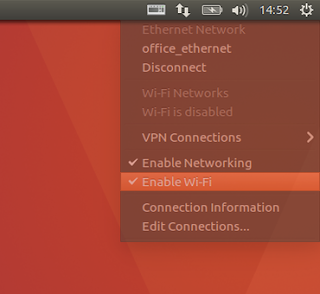
When Install ubuntu 16.04 LTS at Legion Y520, OS can't detect wifi.
To fix this, just command
$ sudo tee /etc/modprobe.d/ideapad.conf <<< "blacklist ideapad_laptop"
and then reboot.
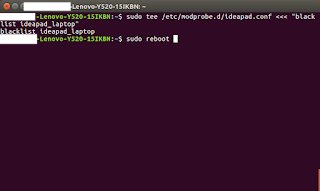
Before do that, "rfkill list" shows Wireless LAN hard blocked: Yes.
But after rebooting, no more hard block and no more problem with wifi.
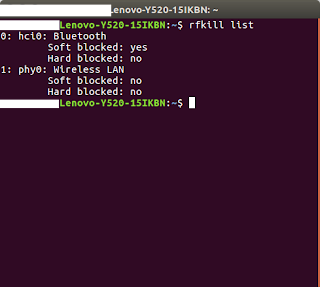
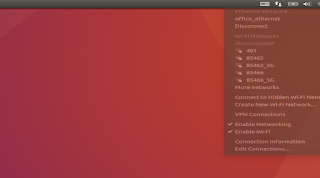
That's all. Missing Wifi is fixed with just two commands.
3. Install nvidia driver (Update on 2018/ 4/ 17. Thanks to Leonardo Gonzales for comment.)
After connect internet (wifi or with ethernet wire), type following command
$ software-properties-gtk --open-tab=4
And select nvidia driver as follow.
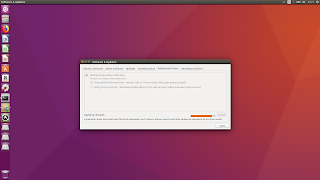
This is also solution for freezing when shutdown/reboot/restart ubuntu 16.04.4.
When you try to shutdown ubuntu on cui-mode (ctrl+alt+f1), if you see message including "nouveau drm failed to idle channel ~~", then just installing nvidia driver instead of using xorg will solve your problem.
https://askubuntu.com/questions/600467/blackscreen-failed-to-idle-channel
- Ubuntu
- On my case, I installed ubuntu 16.04
- Kernel upgarde for latest version
- Nvidia graphic card driver
- For GTX1050(Ti)
- Solution for missing wireless connection
1. Install ubuntu with usb boot disk .
https://www.ubuntu.com/download/desktop/create-a-usb-stick-on-ubuntu
2. Fix missing wireless connection
Thanks for https://askubuntu.com/questions/587743/wifi-hard-blocked/587760

When Install ubuntu 16.04 LTS at Legion Y520, OS can't detect wifi.
To fix this, just command
$ sudo tee /etc/modprobe.d/ideapad.conf <<< "blacklist ideapad_laptop"
and then reboot.

Before do that, "rfkill list" shows Wireless LAN hard blocked: Yes.
But after rebooting, no more hard block and no more problem with wifi.


That's all. Missing Wifi is fixed with just two commands.
3. Install nvidia driver (Update on 2018/ 4/ 17. Thanks to Leonardo Gonzales for comment.)
After connect internet (wifi or with ethernet wire), type following command
$ software-properties-gtk --open-tab=4
And select nvidia driver as follow.

This is also solution for freezing when shutdown/reboot/restart ubuntu 16.04.4.
When you try to shutdown ubuntu on cui-mode (ctrl+alt+f1), if you see message including "nouveau drm failed to idle channel ~~", then just installing nvidia driver instead of using xorg will solve your problem.
https://askubuntu.com/questions/600467/blackscreen-failed-to-idle-channel
Subscribe to:
Posts (Atom)